Table of Contents
Creating a clear and actionable social media report is essential for understanding how your content performs, how audiences engage, and how each platform contributes to your marketing goals.
In this guide, we’ll walk through 7 social media report examples you can use for monthly reporting, analytics reviews, or client presentations. Each example is built in Looker Studio using ready-to-use Data Bloo templates and focuses on a specific platform or reporting need.
Whether you’re looking for a social media analytics report example, a social media analysis report, or a simple example of a social media report, you’ll find practical, real-world use cases below.
1) Facebook Ads Social Media Report Example
Source: Facebook Ads
Setup: Easy — Data Bloo Facebook Ads Connector
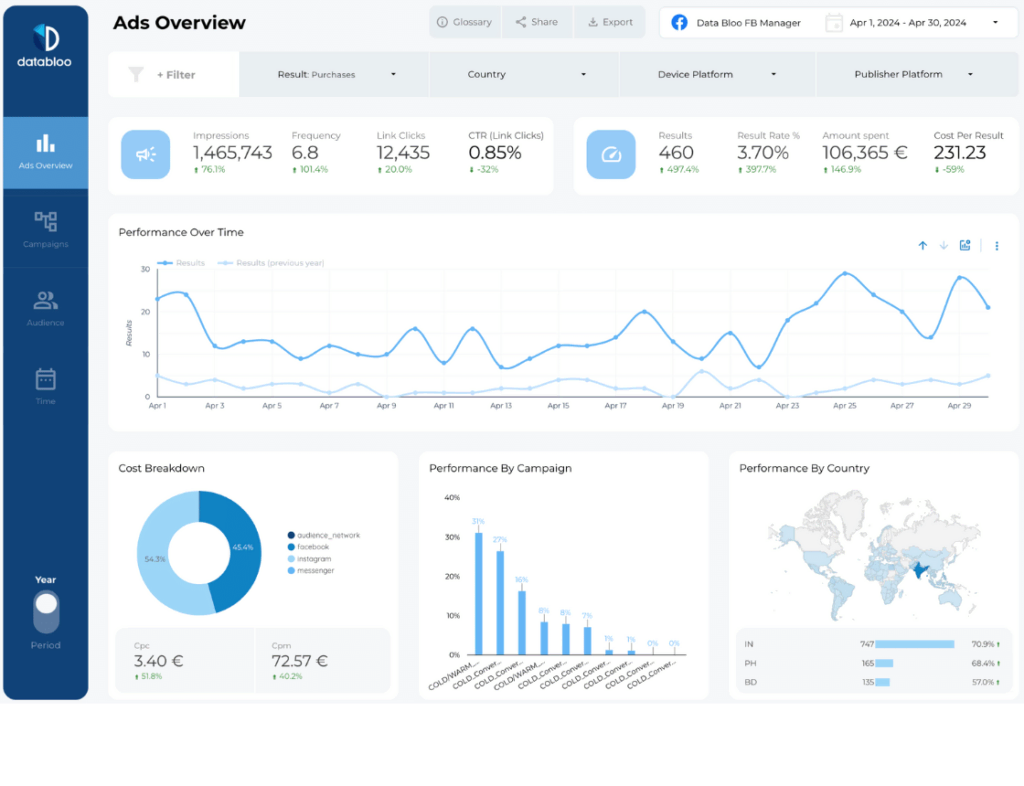
This social media report example focuses on paid performance across Facebook and Instagram campaigns. It’s designed for marketers who need a clear view of ad spend, engagement, and conversions in one place.
Key Features
- Campaign, ad set, and ad-level performance
- Spend, impressions, clicks, CTR, CPC, and conversions
- Audience, placement, and device breakdowns
- Performance trends over time
What You Can Do With This Report
Use this example of a social media report to evaluate paid social ROI, identify top-performing creatives, and optimize budgets. It’s ideal for monthly social media report examples where paid performance needs to be clearly communicated to stakeholders or clients.
2) Facebook Insights Social Media Analytics Report Example
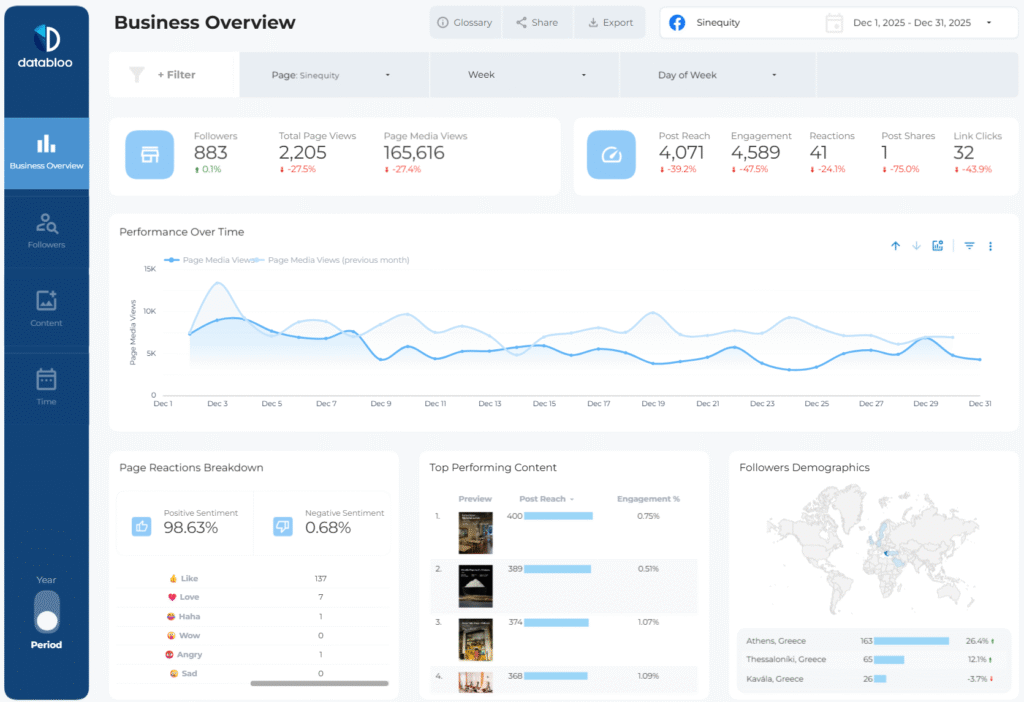
Source: Facebook Insights
Setup: Easy — Data Bloo Facebook Insights Connector
This social media analytics report example focuses on organic Facebook Page performance. Instead of ad metrics, it highlights how content resonates with your audience and how your community grows over time.
Key Features
- Page reach and impressions
- Post-level engagement metrics
- Follower growth trends
- Audience demographics and location
What You Can Do With This Report
Use this social media analytics report example to understand which posts drive engagement, track audience growth, and refine your organic content strategy. It’s especially useful for brands prioritizing community-building and brand awareness.
3) Instagram Insights Social Media Report Example
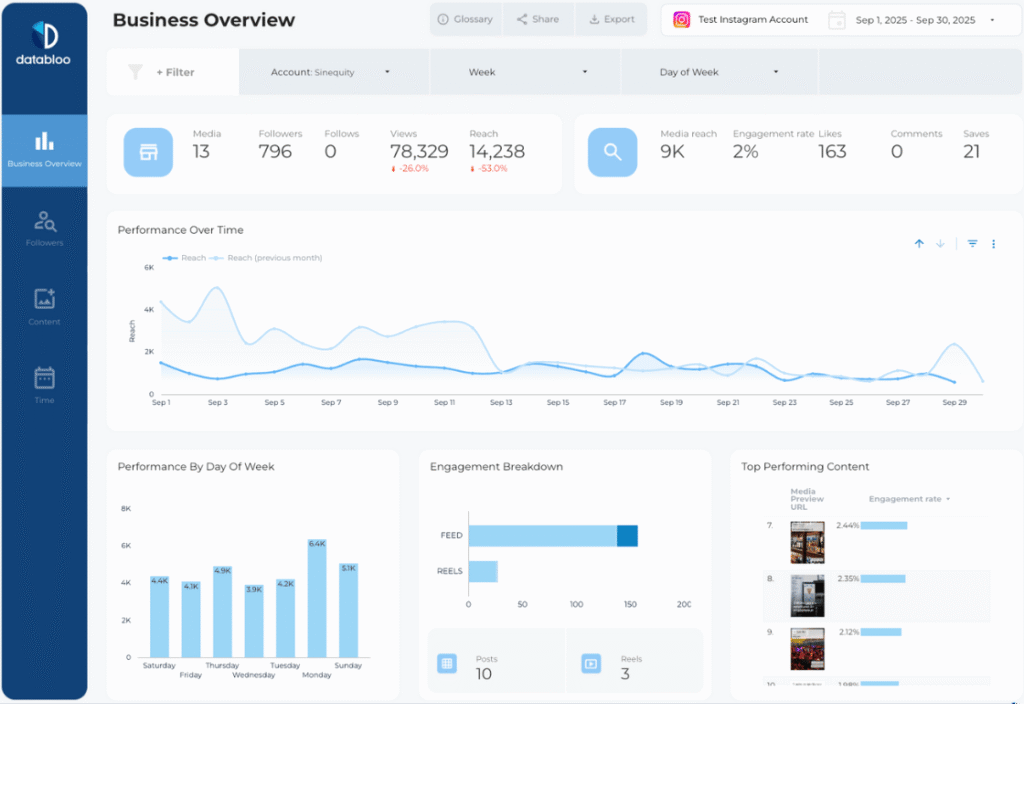
Source: Instagram Insights
Setup: Easy — Data Bloo Instagram Insights Connector
This example social media report focuses on organic Instagram performance, helping you understand how posts, Reels, and Stories contribute to engagement and growth.
Key Features
- Profile visits and follower growth
- Engagement metrics for posts, Reels, and Stories
- Content performance trends over time
- Audience interaction insights
What You Can Do With This Report
Use this example of a social media report to identify which content formats perform best, optimize posting frequency, and track monthly growth. It’s ideal for social media analysis reports centered on visual storytelling and engagement.
4) LinkedIn Company Page Analytics Report Example
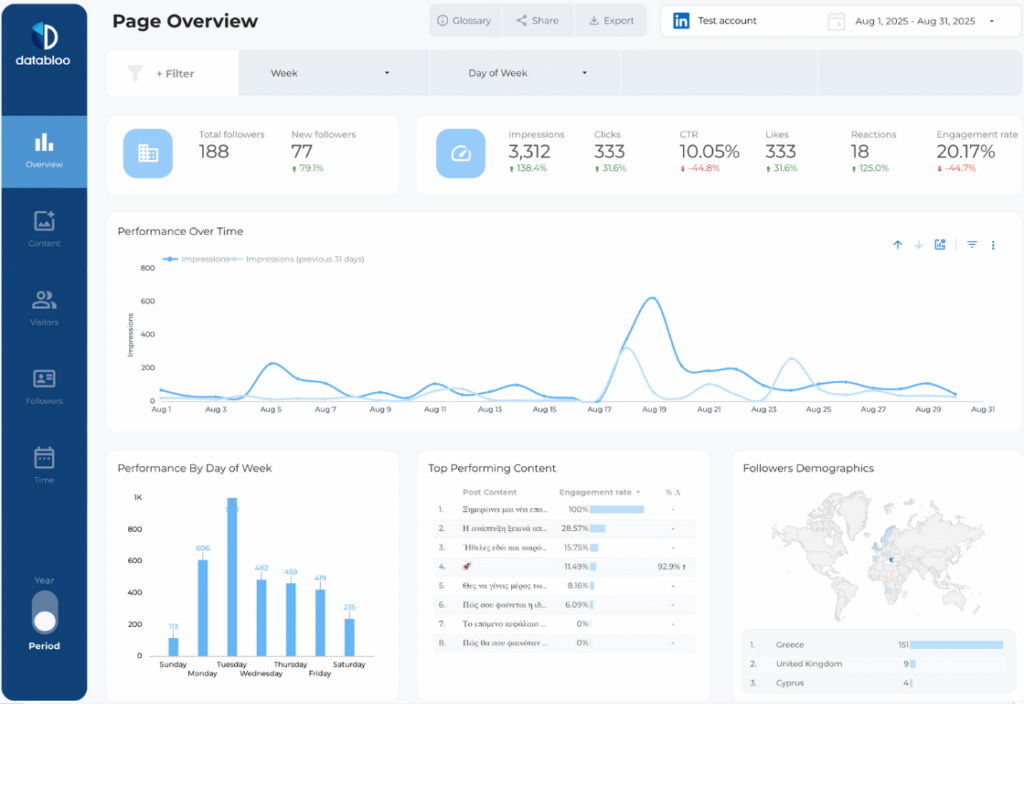
Source: LinkedIn Company Pages
Setup: Easy — Data Bloo LinkedIn Connector
This social media analysis report example is designed for B2B teams tracking brand visibility and engagement on LinkedIn.
Key Features
- Follower growth and impressions
- Post engagement and CTR
- Audience demographics (industry, job function, seniority)
- Content performance trends
What You Can Do With This Report
Use this social media analysis report example to understand how professional audiences interact with your content. It’s especially useful for B2B marketing, employer branding, and thought leadership reporting.
5) TikTok Organic Social Media Analysis Report Example
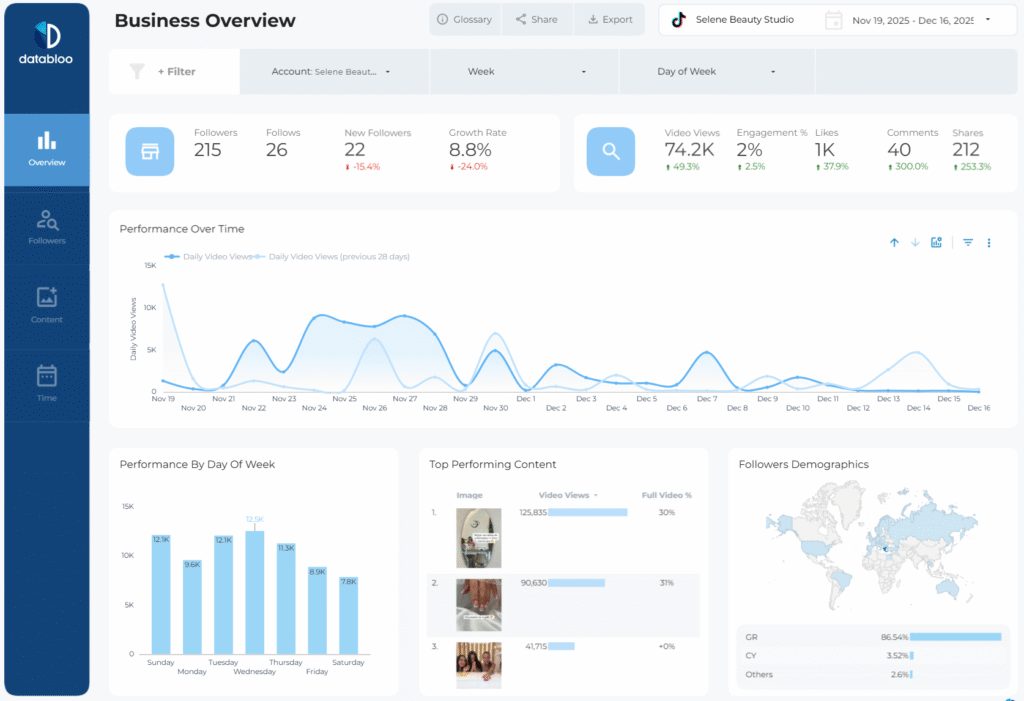
Source: TikTok
Setup: Easy — Data Bloo TikTok Organic Connector
This social media analysis report example focuses on organic TikTok performance, where trends move fast and content performance can change quickly.
Key Features
- Video views, likes, comments, and shares
- Engagement and completion rates
- Follower growth trends
- Top-performing videos
What You Can Do With This Report
Use this example social media report to identify breakout videos, track engagement spikes, and refine your TikTok content strategy. It’s especially helpful for weekly or monthly reviews where speed and trends matter.
6) YouTube Channel Social Media Report Example
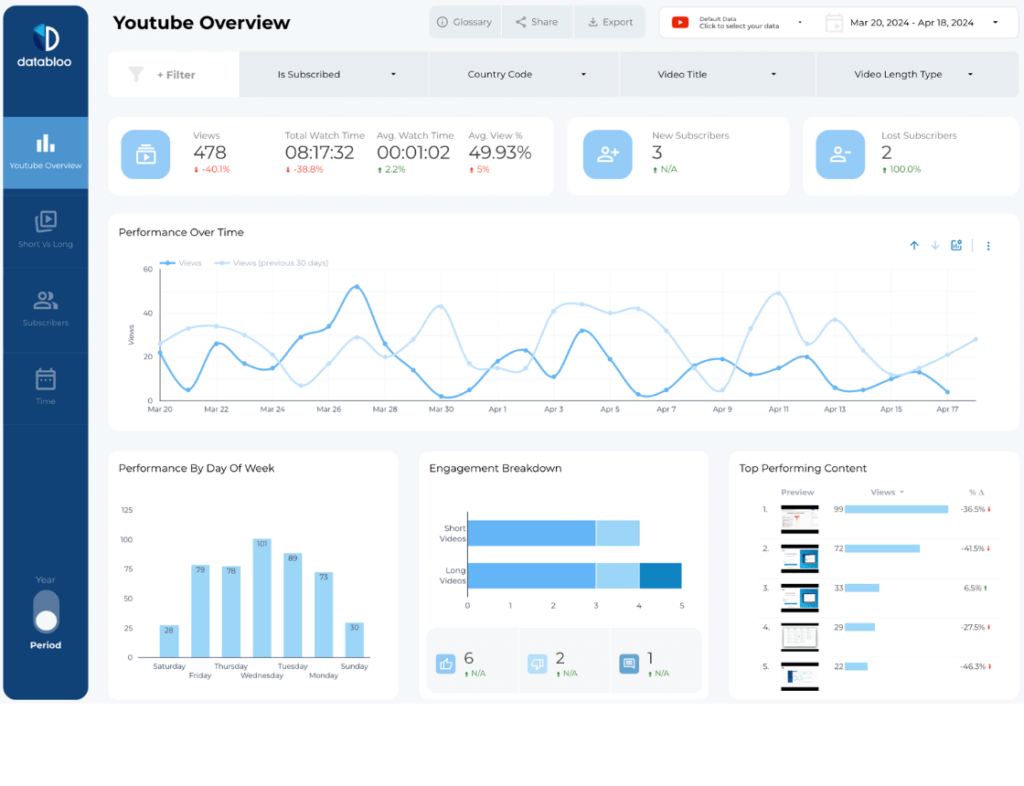
Source: YouTube Analytics
Setup: Easy — Native YouTube Connector
This social media report example provides a comprehensive view of YouTube channel performance and audience behavior.
Key Features
- Views, watch time, and subscriber growth
- Video-level performance analysis
- Audience retention and engagement
- Channel growth trends
What You Can Do With This Report
Use this example of a social media report to understand which videos drive sustained engagement and long-term growth. It’s well-suited for creators and brands investing in evergreen video content.
7) Bonus: Social Media Performance Overview (GA4)
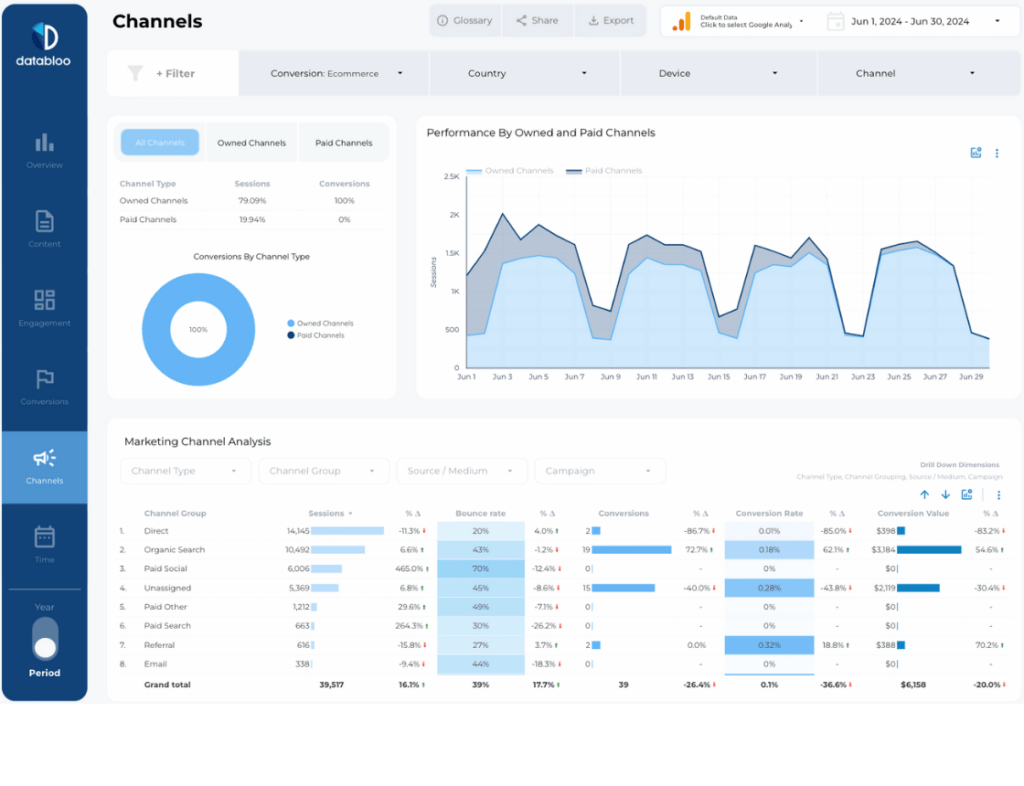
Source: Google Analytics 4
Setup: Easy — Native GA4 Connector
This social media analytics report example connects social media activity with website behavior, something platform-native reports can’t do alone.
Key Features
- Social traffic acquisition metrics
- Landing page performance
- Engagement and conversion tracking
- Channel comparison insights
What You Can Do With This Report
Use this bonus example of a social media report to understand how social media traffic behaves on your website and how it contributes to leads or conversions.
What Makes a Good Social Media Report?
A good social media report goes beyond vanity metrics. The best social media report examples focus on trends, comparisons, and insights that help teams make better decisions.
Most effective reports include:
- Clear goals and KPIs
- Platform-specific metrics
- Time-based comparisons
- Visual trends and summaries
- Actionable takeaways
Build Your Own Social Media Report in Looker Studio
These social media report examples show how flexible Looker Studio can be when paired with the right templates. Whether you need monthly social media report examples, platform-specific analytics, or a cross-channel overview, automation saves time and improves consistency.
With Data Bloo templates, you can create professional social media reports in minutes — without manual exports or spreadsheets.
Browse All Looker Studio Templates
FAQ
What is a social media report?
A social media report summarizes performance across platforms, including reach, engagement, follower growth, and content effectiveness.
What should a social media analytics report include?
It should include impressions, engagement metrics, audience growth, content performance, and trends over time.
How often should social media reports be created?
Most teams create monthly social media report examples to track progress and optimize strategy.
Can social media reporting be automated?
Yes. Looker Studio templates allow you to automate data collection and keep reports updated in real time.